Tesla Entertainment Apps to Try on Your Next Road Trip
Tesla entertainment apps transform long drives into fun experiences for everyone in the car. From streaming movies to playing games, the Tesla touchscreen offers more than you might think. Whether you own a Model 3, Model Y, or another Tesla, there are apps to keep passengers happy. These apps work with the Tesla infotainment system and are easy to install. Keep reading to find the best Tesla entertainment apps for your next adventure.
Road trips are one of the best parts of owning a Tesla. You get smooth driving, great range, and a big touchscreen that does so much more than just navigation. But here is the thing many people miss. Tesla entertainment apps can turn a boring highway stretch into a movie theater on wheels.
Whether you are heading cross-country or just driving to the next campground, the right apps make all the difference. Passengers can watch shows, play games, listen to music, and stay entertained for hours. And the best part is that most of these apps are already built right into the Tesla system or easy to download.
In this guide, we will walk you through the best Tesla entertainment apps available right now. We will cover streaming, gaming, music, and useful tools. You will learn how to set them up, what works best, and how to avoid common mistakes. Let us get into it.
Key Takeaways
- Streaming apps like Netflix and Disney+ make long drives feel shorter for passengers.
- Tesla gaming apps offer fun for all ages, from classics to multiplayer titles.
- Setting up Theater Mode is quick and easy once you know the steps.
- Not all apps work while driving, so passengers should handle the controls.
- Staying updated with Tesla software updates ensures access to the latest apps.
- Battery management matters when using multiple apps on a road trip.
📑 Table of Contents
- Why Tesla Entertainment Apps Make Road Trips Better
- Best Streaming Apps for Tesla
- Gaming Apps to Keep Everyone Entertained
- Music and Podcast Apps for the Drive
- Useful Tools and Lifestyle Apps
- Tips for Getting the Most Out of Tesla Entertainment Apps
- Common Mistakes to Avoid with Tesla Apps
- Final Thoughts on Tesla Entertainment Apps
Why Tesla Entertainment Apps Make Road Trips Better
Long hours on the road can test anyone’s patience. Kids get restless. Adults get bored. But with the right Tesla media setup, the back seat becomes a personal entertainment hub. The Tesla infotainment system is powerful enough to handle games, video, and music without lag.
What makes Tesla entertainment apps so appealing is how seamlessly they integrate with the car. You do not need extra screens or devices. The touchscreen doubles as a media center when the car is parked or in Park. This means every passenger can enjoy their own content without fighting over a phone.
The Power of the Tesla Touchscreen
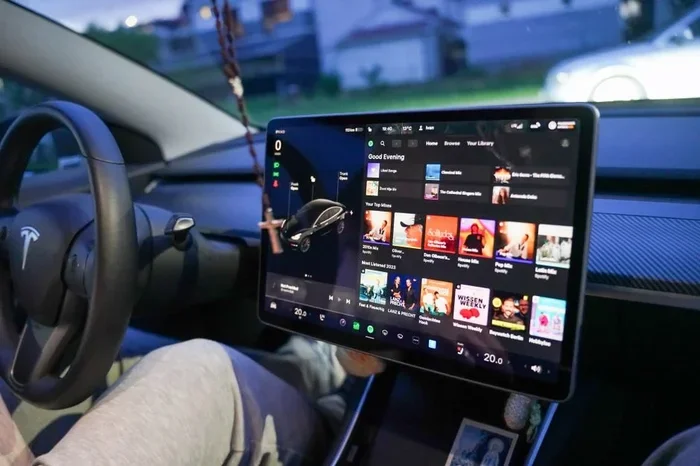
The Tesla display is one of the biggest selling points of the car. It is bright, responsive, and easy to use. When you add Tesla entertainment apps to the mix, it becomes a portable entertainment system. Streaming video, playing games, or browsing the web all feel smooth and natural on the screen.
Another great feature is the ability to use the Tesla theater mode. This puts video content front and center on the display. The controls are simple, and the sound comes through the car speakers. It really feels like you are in your own private cinema.
What Works Out of the Box
Tesla vehicles come with some built-in apps already installed. These include Spotify, YouTube, Netflix, and a few others. You just need to log in with your accounts and start using them. No extra downloads are needed for these core Tesla streaming apps.
However, not every app is available from day one. Tesla adds new apps through software updates regularly. This is why keeping your Tesla software update current matters so much. New apps and features often arrive with these updates.
Best Streaming Apps for Tesla
Streaming is the number one way people use Tesla entertainment apps. When the car is parked, passengers can watch movies, shows, and videos from their favorite platforms. Here are the top streaming options that work well with the Tesla system.
Netflix and Disney+ on the Go
Netflix and Disney+ are two of the most popular Tesla media apps available. Both are built into the Tesla system and work beautifully. You can download content ahead of time for offline viewing, which is perfect for areas with weak signal.
These apps support full HD quality on the Tesla display. The interface is easy to navigate, and profiles can be switched quickly. Kids can watch their favorite Disney movies while adults catch up on Netflix series. It is a win-win for family road trips.
YouTube and Other Streaming Options
YouTube is another standout in the world of Tesla entertainment apps. The free version works well, and YouTube Premium subscribers get an even better experience with no ads. Other platforms like Amazon Prime Video and Hulu are also available on newer Tesla models.
For music lovers, Spotify remains a top choice. It offers millions of songs, playlists, and podcasts. Apple Music and Amazon Music also work with the Tesla system. These Tesla music apps make the drive feel more enjoyable for everyone.
Gaming Apps to Keep Everyone Entertained
Gaming is a huge part of the Tesla experience. The touchscreen controls make playing games fun and intuitive. Whether you have a short rest stop or a long layover, Tesla gaming apps can keep everyone entertained.
Top Games Available on Tesla
Tesla comes with several built-in games like Beach Buggy Speedway, Solitaire, and Chess. But the real fun starts when you explore the broader selection. Games like Cuphead, Baldur’s Gate 3, and Cyberpunk 2077 are playable on Tesla vehicles through Steam or other methods.
Some Tesla entertainment apps focus on casual gaming. Titles like Angry Birds and Tetris are great for quick sessions. These are perfect for younger passengers or anyone who wants a simple game without a steep learning curve.
Multiplayer Fun for Passengers
One of the best things about Tesla gaming apps is multiplayer support. Multiple players can connect using the touchscreen or even their phones as controllers. This makes long stops at rest areas or campgrounds much more fun.
Games like Mario Kart and Among Us work well in split-screen mode on Tesla. Passengers can team up or compete against each other. It is a great way to pass time and create fun memories during a road trip.
Music and Podcast Apps for the Drive
Music sets the mood for any road trip. The Tesla system supports a wide range of audio apps that keep the energy high or help everyone relax. These Tesla audio apps are essential for any long drive.
Spotify, Apple Music, and More
Spotify is the most popular music app on Tesla. It offers curated playlists, radio stations, and podcasts. Apple Music users will also find a smooth experience. Both apps integrate directly with the Tesla interface and support voice controls.
Podcast fans have great options too. Apps like Pocket Casts and Overcast work well with the Tesla browser. You can also access podcast apps through the web browser if a native app is not available. This gives you access to thousands of shows on the go.
Radio and Internet Browsing
The Tesla browser opens up even more possibilities for Tesla entertainment apps. You can access internet radio stations, news sites, and blogs. While the browser is not meant for driving, it is perfect for parked entertainment.
Some users also tune into live radio through apps like TuneIn. This gives you access to thousands of AM and FM stations from around the world. It is a nice touch when you want variety during a long drive.
Useful Tools and Lifestyle Apps
Beyond streaming and gaming, there are practical apps that enhance the Tesla experience. These Tesla utility apps help with everything from charging to staying organized on the road.
Camp Mode and Passenger Comfort
One of the coolest features is Camp Mode. It keeps the climate control running while you sleep or rest. You can also use Tesla entertainment apps while in Camp Mode without draining the battery too quickly. This is perfect for overnight stops at campgrounds.
Some Tesla owners use the car as a mobile entertainment center at campsites. They stream movies, play music, and even host outdoor movie nights using the Tesla display. The possibilities are really endless when you combine Tesla media with creative thinking.
Navigation and Trip Planning Tools
While not strictly entertainment, navigation apps like A Better Routeplanner help make road trips smoother. These tools integrate with Tesla to plan charging stops and optimize your route. Less time worrying about charging means more time enjoying Tesla entertainment apps.
You can also use the Tesla browser to check weather, find restaurants, and discover attractions along your route. All of these tools work together to make the trip more enjoyable and stress-free.
Tips for Getting the Most Out of Tesla Entertainment Apps
Now that you know what is available, let us talk about how to get the most out of these apps. A few simple tips can make a big difference in your experience.
Setting Up Theater Mode
To activate Theater Mode, tap the screen and select the Theater Mode icon. This puts all your media apps in one place. You can then choose Netflix, YouTube, or any other streaming app and start watching. Make sure the car is in Park before using this feature.
Quick tip: Download content before your trip when you have Wi-Fi. This ensures you can watch even in areas with poor internet. Offline downloads are one of the best-kept secrets of Tesla entertainment apps.
Maximizing Battery While Using Apps
Using entertainment apps while parked does drain the battery, but not as much as you might think. To conserve energy, lower the screen brightness when possible. You can also turn off apps you are not actively using. This helps preserve range for the next leg of your trip.
If you are using Camp Mode with apps running, keep an eye on your battery level. Tesla provides a battery percentage indicator that makes this easy. Planning your charging stops around your entertainment time keeps everything running smoothly.
Common Mistakes to Avoid with Tesla Apps
Even though Tesla entertainment apps are easy to use, some common mistakes can cause frustration. Avoiding these pitfalls will help you get the best experience every time.
One big mistake is trying to use video apps while driving. Tesla locks most video features when the car is in Drive. This is a safety feature, and it is there for good reason. Always let passengers handle the controls when the car is moving.
Another mistake is forgetting to update the Tesla software. Older software versions may not support the latest apps. Regular Tesla software updates ensure you have access to new features and app compatibility.
Some users also overlook the importance of logging out of shared accounts. If you rent a Tesla or share your vehicle, make sure to sign out of personal accounts. This protects your privacy and keeps your recommendations and watch lists safe.
Final Thoughts on Tesla Entertainment Apps
Tesla entertainment apps truly change the road trip experience. They turn dead time into fun time for every passenger. Whether you are streaming movies, playing games, or listening to podcasts, the Tesla system has you covered.
The best part is how easy everything is to set up and use. Most apps are already on the car, and adding new ones is straightforward. With regular Tesla software updates, the list of available apps keeps growing. You will always find something new to try.
So the next time you plan a road trip, take a few minutes to explore your Tesla entertainment apps. You will be glad you did. Your passengers will thank you, and the journey will feel shorter and more enjoyable for everyone. Happy travels.
Frequently Asked Questions
Can you use Netflix and other streaming apps while driving a Tesla?
No, most streaming apps lock when the car is in Drive. This is a safety feature built into Tesla. Passengers can use these apps freely when the car is parked or in Park. Drivers should focus on the road and let others handle the entertainment.
What Tesla models support the most entertainment apps?
Newer Tesla models like the Model 3, Model Y, and Model S have the best app support. These vehicles receive the latest Tesla software updates first. Older models may have fewer apps available, but most core features still work well.
Do Tesla entertainment apps work offline?
Some apps like Netflix and Disney+ allow you to download content for offline viewing. This is perfect for road trips through areas with weak or no internet. Just download your favorite shows or movies while connected to Wi-Fi before you leave.
Are there free Tesla entertainment apps available?
Yes, several free apps work on Tesla. YouTube has a free tier, and there are free games built into the system. The Tesla browser also gives you access to free web-based entertainment. You do not need paid subscriptions to enjoy some Tesla media options.
How do you add new apps to a Tesla?
You can browse and download apps directly from the Tesla app store on the touchscreen. Simply go to the app section, search for the app you want, and tap install. Some apps may require you to log in with your account before you can start using them.
Do Tesla entertainment apps drain the battery quickly?
Using apps while parked does use some battery, but the drain is usually minimal. Streaming video uses more power than audio apps. To conserve battery, lower screen brightness and close apps you are not using. Overall, the entertainment features are designed to be battery-friendly.
=== CONCLUSION ===
Tesla entertainment apps are a game-changer for road trips and everyday driving. From streaming movies to playing games and listening to music, the options are vast and easy to use. The Tesla touchscreen makes everything feel smooth and natural. Whether you are traveling with kids, friends, or just enjoying solo time, there is something for everyone.
Take some time to explore what is available on your Tesla. Try out different apps, set up Theater Mode, and find what works best for your lifestyle. With the right Tesla media setup, every drive becomes more enjoyable. So go ahead, load up your favorite apps, and hit the road with confidence.